
Aria's conversations, Part 3: Fitting a long conversation into a small model
One conversation that never ends meets a context window that does. Summaries, a token budget with a strict order of what to drop, recovering from overflow, and an OpenAI-compatible API.

Part 1 gave Aria one conversation that never ends. That has a cost: every model has a context window, the amount of text it can read at once, and months of messages don’t fit in it. Neither do months of messages plus memories, knowledge, personality, mood, and everything else that goes into a reply.
This post is about the budget. What goes in, what gets summarised, what gets dropped first, and what is never dropped at all.
Summaries: remembering the conversation itself
Long-term memory (the memory posts) keeps facts about you. It doesn’t keep the thread of the conversation: what you were talking about an hour ago, the joke from this morning, the plan you were halfway through making.
That’s the job of the conversation summary. When more than 30 messages haven’t been summarised yet, a background job folds the older ones into a running summary, always leaving the newest 12 out so the most recent exchange stays word for word. The summary is incremental: each update adds to the last one, and the conversation remembers where the summary ends, so nothing is summarised twice.
A prompt then contains the summary, followed by only the messages after it. A conversation of thousands of messages ends up costing a summary plus a few dozen recent messages.
The budget
Everything else is handled by a context budget. The available space is the model’s context window minus room kept free for the reply itself: 1,024 tokens by default, plus another 2,048 when Aria is going to reason before answering.
Token counts are estimated, at about four characters per token plus a little per message. That’s crude, and on purpose: the estimate only decides what fits, and it’s never reported as actual usage. It’s fast, works the same for every model, and errs on the safe side.
The real trouble is when the prompt doesn’t fit. A prompt that’s too big is trimmed in a fixed order, least important first:
- Knowledge from the web, the lowest-ranked article first.
- Relevant memories, the lowest-ranked first.
- The mood estimate for this reply.
- The oldest recent messages, one at a time, but never the latest exchange (your message and the reply before it).
- Profile memories, the always-included facts about you.
- The conversation summary.
- Optional sections, least important first: conversation style examples, its look, curiosity, life, self-awareness, conversation tempo, open threads, spelling notes, attachment.
And some things are never removed: the core instructions, Aria’s personality, the relationship, the style and format for this reply, a game in progress, and your current message.
The order reflects a simple question: if Aria could only keep one of these two, which would it rather have? An article about something you mentioned is nice to have. What you said two minutes ago is not optional. Your peanut allergy outranks both.
Telling the model how big the window is
The budget is only as good as its idea of the window size, and model servers don’t always make that easy.
Ollama, for example, defaults to a small context and silently cuts long prompts from the start. The start of the prompt is exactly where Aria’s personality and core instructions live, so the failure mode is a reply that’s fluent and has quietly forgotten who it is. Aria now sends the context size with every request, so nothing is cut behind its back.
With LM Studio, which I use now, Aria reads the context length of the loaded model and fits its prompts to that. Switching to a model with a bigger window gives Aria more room automatically.
When the model still says no
Even with a careful budget, a model can reject a prompt as too long: the estimate was off, a tool result was huge, or the server was configured with less than it reported. Aria recognises a context-overflow error and retries once with half the budget. The trimming order above runs again, harder, and you get a slightly less informed reply instead of an error.
That retry happens before the reply starts streaming (Aria waits for the first chunk, as Part 1 described), so it’s invisible in the chat.
Seeing exactly what was sent
All of this is easy to get wrong in ways that are hard to see. A reply that “forgot” something might have been trimmed, or never retrieved, or retrieved and ignored.
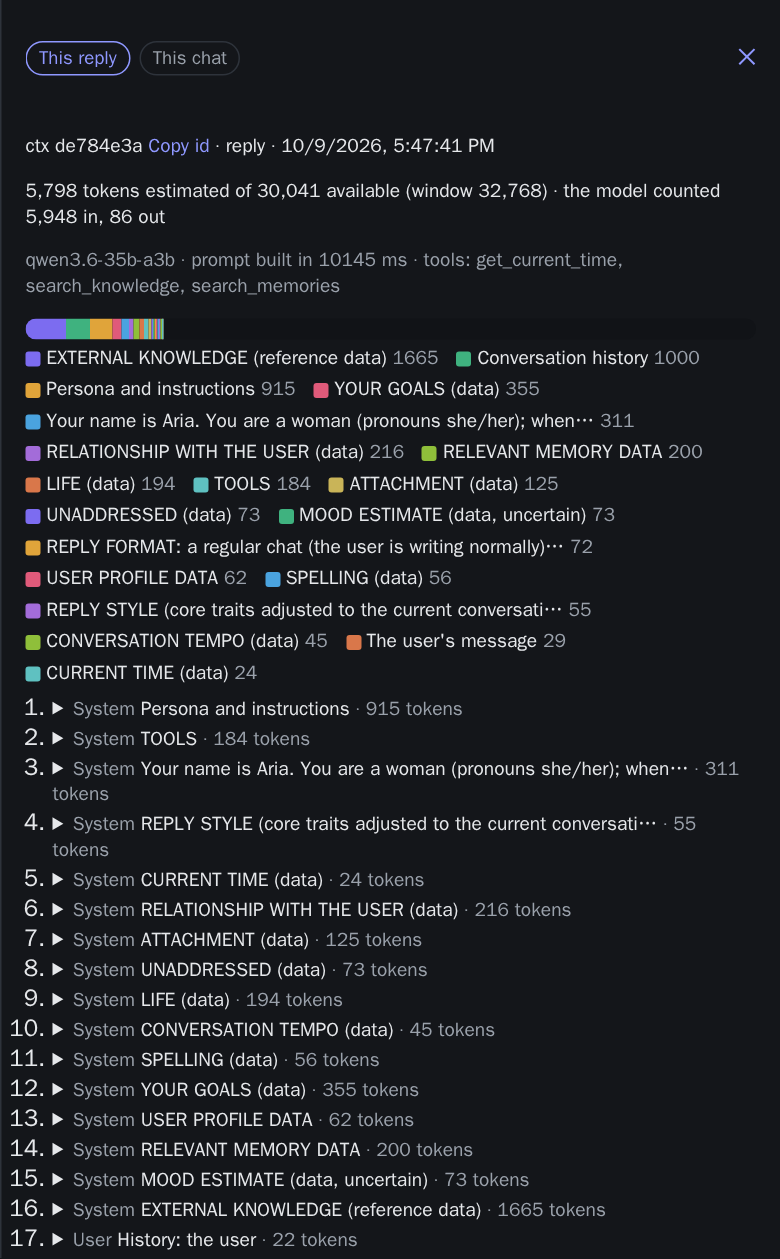
So with the debug tools on, every reply keeps a context trace: the exact prompt that was sent, split into labelled parts, each with its estimated size, plus the budget and what was dropped to fit. Each trace has a short id shown under the reply (like “ctx 3f9a1c2e”), so when a reply looks off, you can open exactly what Aria was given. Traces are kept for 14 days.
Most “why did it say that?” questions are answered by looking at what it was given.
Other apps can talk to Aria too
One of the goals from the introduction was openness: other tools should be able to talk to Aria, not just its own chat app. Aria serves an OpenAI-compatible API with chat completions, embeddings and the newer Responses API, and it appears as a model named after the personality.
Any app that speaks the OpenAI API can point at Aria instead. Requests through it get the same personality and your memories for that personality, with the client’s own message history. By default nothing is saved: no extraction, no relationship changes, no summaries. It’s Aria as a well-informed model, not Aria as a conversation partner. An app that wants the full conversation can opt into a server-side conversation with a header (X-Companion-Conversation-Id).
The budget treats these requests differently in one important way: a client’s messages are never trimmed. If an app sends a long history, that’s the app’s decision to make.
What I learned
- Decide the drop order before you need it. Writing down what goes first makes every trade-off explicit instead of accidental.
- Protect the start of the prompt. Silent truncation from the start is the worst kind of failure: everything still works, just as the wrong personality.
- Estimate cheaply, recover once. A rough estimate plus one retry at half the budget beats an exact count for every model.
- Make the prompt inspectable. Context traces turned guesswork into reading.
That’s the conversation side. Next in the series: running it locally, from the Docker stack to what happens when parts of it break.